 NoteKrypt
 Your notes are totally encrypted.
That includes note content, structured blocks, file attachments, and the offline copies stored on your device.
NoteKrypt is built around an offline-first vault: the device derives the keys, encrypts before sync, keeps readable content local, separates reminder delivery from the main vault path, and relies on backups so recovery does not silently strand older encrypted data.
"End-to-end encrypted" in NoteKrypt is meant to describe how the vault behaves in practice: the device encrypts first, the sync layer stores ciphertext, and recovery depends on the keys you keep.
That includes note content, structured blocks, file attachments, and the offline copies stored on your device.
Sync exists to move encrypted payloads and metadata between devices. The trust boundary is designed to stay on the device.
Encryption and decryption happen on the device, so you can still unlock the vault, write notes, and review content before the network catches up.
If local key material disappears after a password reset, account recovery, or device move, the encrypted data can still exist but remain unreadable without backup restore.
NoteKrypt does not claim every helper mechanism is already post-quantum today. The goal is to keep the main vault path strong and make narrower helper paths easier to upgrade over time.
AES-256-GCM protects note bodies, structured blocks, file attachments, and offline copies stored on the device.
Narrower paths like today’s RSA-wrapped reminder delivery are intentionally separate, so they can move to newer schemes without redesigning the whole vault.
This is the current implementation model reflected in the app code and backup flows.
On unlock, NoteKrypt derives a 256-bit KEK from your password with PBKDF2-HMAC-SHA256 and 100,000 iterations. That KEK is used to unwrap vault keys already stored on the device.
The app keeps a random master DEK for the vault. Note content, structured blocks, and encrypted attachment payloads are protected with AES-256-GCM using vault keys, not your raw password.
A separate notification DEK is derived from the master DEK with an HMAC/HKDF-style derivation path. It exists so reminder notification text can use a narrower key path than the full vault.
The master DEK and notification DEK are wrapped with the password-derived KEK and saved in secure storage. Device auto-unlock can add an extra device-wrapped copy without changing the vault keys themselves.
When a note syncs, the cloud receives encrypted payloads, encrypted attachments, sync metadata, and recovery-related metadata. The server is meant to coordinate sync, not hold readable note bodies.
For encrypted sharing, NoteKrypt decrypts the note locally and re-encrypts it with a dedicated share key. The recipient unlocks with that share key path instead of getting your vault key.
The important distinction is between the main vault-encryption path and narrower helper paths. NoteKrypt is designed so the strongest content protection sits on the vault itself, without pretending every helper mechanism is already post-quantum.
NoteKrypt does not claim the whole stack is fully post-quantum today. The goal is to keep the strongest practical protection on the vault content itself, while making narrower helper paths replaceable over time.
Vault content is protected with AES-256-GCM, a symmetric design. That symmetric layer is the part of the current stack with the strongest long-term margin against future quantum-style pressure.
Helper paths like RSA-wrapped reminder delivery or future asymmetric sharing helpers are intentionally kept narrower than the main vault path, so they can migrate to newer schemes without changing how every note is stored.
NoteKrypt uses the cloud for sync and delivery support, but it tries to keep the trust boundary on the device.
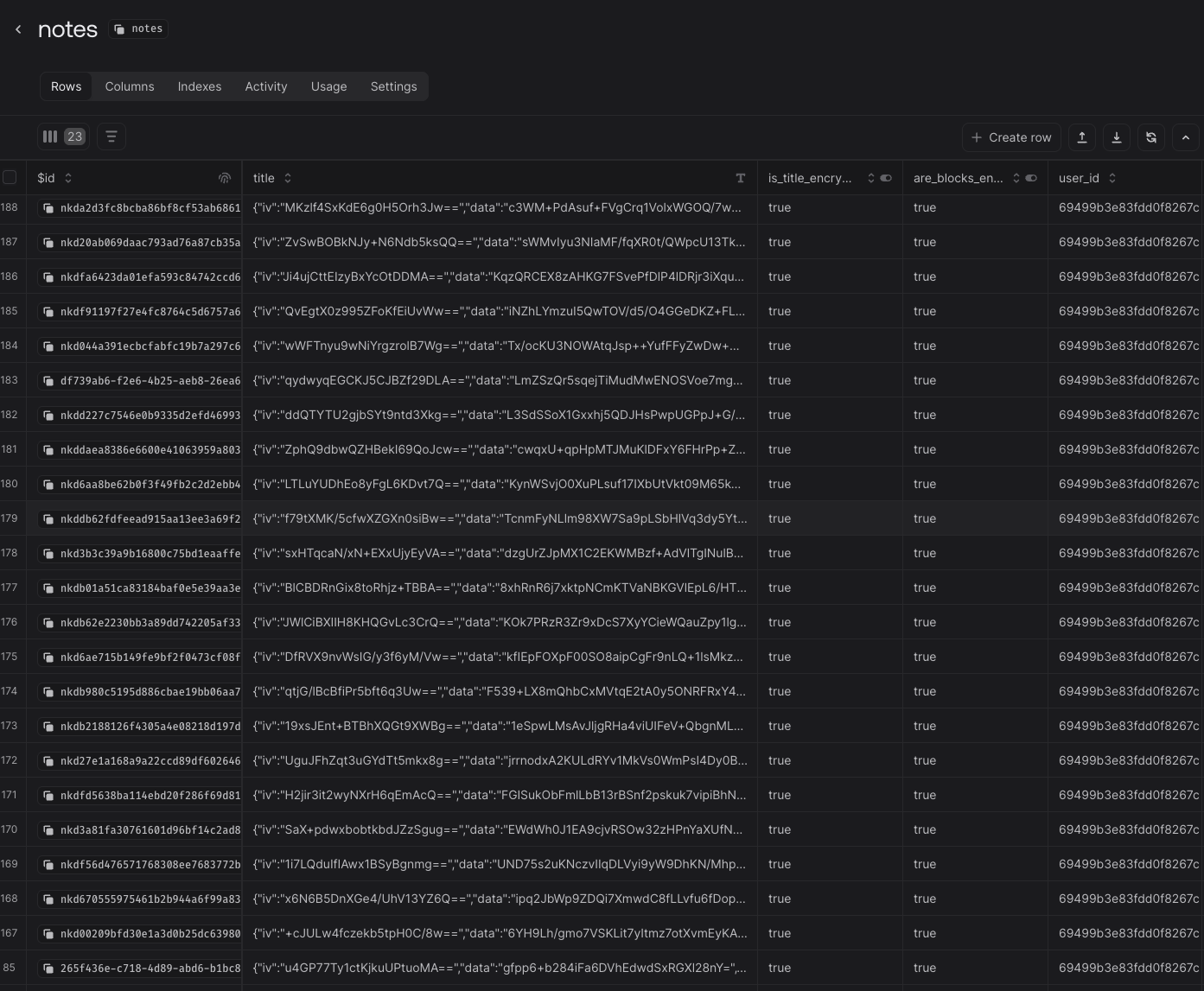
This is the kind of evidence you want to see in storage: encrypted payload blobs instead of readable note titles, note bodies, and block content. The server can store sync rows and metadata without seeing your real note content in plaintext.
Password entry, KEK derivation, vault unlock, note encryption, note decryption, backup export, backup restore, and the original note plaintext all stay on the device.
Cloud services store ciphertext, attachments, sync state, sharing state, access metadata, and reminder schedules. That lets devices stay in sync without moving the core trust boundary away from the device.
Reminder titles and descriptions are encrypted with the notification DEK. The server keeps an RSA-wrapped copy of that DEK so reminder workers can decrypt only the reminder payload needed for delivery time.
The reminder path should not need your full vault key or readable note bodies. It is intentionally separated from the main note-encryption path so reminder delivery stays narrower than vault access.
Sharing is its own encryption story. The goal is to make collaboration possible without turning your personal vault key into a shared secret.
Shared-note flows on Pro and Elite keep the collaboration path separate from the owner vault. The app can re-encrypt content for recipients without exposing the original vault key.
The current implementation supports public, key-in-URL, and separate-key modes. Encrypted public sharing can place the key in the URL or keep it separate behind an extra passphrase flow.
Shared content and attachment delivery follow the same idea: the receiving side gets a share-specific path, not unrestricted access to the owner vault.
Elite collaboration adds presence and live editing, but it does not change the basic requirement that content must be decrypted and re-encrypted through the allowed share path.
NoteKrypt treats recovery as part of the security model. If local vault keys disappear, the backup path is what keeps older encrypted work recoverable.
Changing the password does not require re-encrypting every note. The master DEK stays the same; NoteKrypt simply re-wraps the vault keys with a new KEK derived from the new password.
A reset flow can leave you authenticated to the account but missing the local vault keys that decrypt older content. In that case, the app prompts for backup restore because login success is not the same as vault recovery.
The backup flow encrypts the master DEK with a separate backup passphrase and exports it as a file or QR-compatible payload. The app also preserves extra security-key enrollment metadata in the backup package.
Anyone with both the backup package and its passphrase can restore the vault. If you lose both the local key material and the backup path, older encrypted data may be gone for good.
A successful account login does not automatically restore old encrypted notes if the device no longer has the vault keys. Export the backup, protect its passphrase, and keep it available for password resets, account recovery, and new-device restores.
Security questions deserve exact answers. If you want a deeper walkthrough of a specific NoteKrypt workflow, contact the team directly.